This article is about building an unstructured data pipeline using RAG.
A RAG (Retrieval-Augmented Generation) system works only if the data behind it is:
- clear
structured
relevant
The pipeline we describe turns messy, unstructured data (PDFs, text files, random documents) into small, meaningful chunks, converts them into embeddings, and saves them in a vector index that the AI can query instantly.
The pipeline is:
1. Corpus Composition; Ingestion
Choose what data goes in.
Bad data lead to bad answers.
2. Preprocessing
Make everything “clean”:
fix formatting, remove weird characters, normalize it.
3. Parsing
Extract useful text from PDFs, HTML, Word files, etc.
4. Enrichment
Add helpful metadata (titles, sections, tags) and remove noise.
5. Metadata Extraction
Pull out structure: chapter titles, authors, …
This makes future search much faster.
6. Deduplication
Remove duplicate or nearly duplicate documents.
7. Filtering
Throw out irrelevant documents.
8. Chunking
Break big documents into small, meaningful pieces.
This step massively affects RAG quality.
Small chunks = more precision.
9. Embedding Generation
Each chunk becomes a numerical vector capturing meaning. This is the “magic” that allows the AI to semantically search.
10. Indexing; Storage
Store all vectors in a high performance index.
Now the AI can instantly find relevant chunks when you ask something.
If the LLM is given irrelevant, noisy, or missing information, it will hallucinate or answer incorrectly.
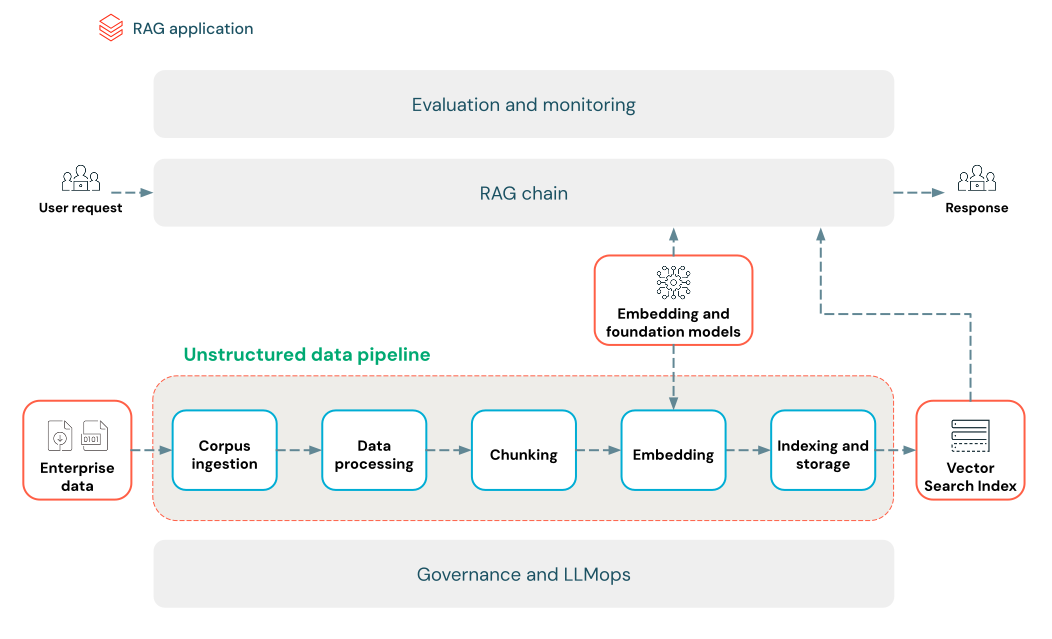
© Image. Databricks. https://docs.databricks.com/
This section explains how to turn unstructured data — like PDFs, text files, and other documents— into a vector index that AI systems can search through efficiently. The idea is to convert messy, free‑form content into structured, searchable representations that Retrieval‑Augmented Generation (RAG) systems can use to answer questions accurately.
Corpus Composition; Ingestion
Give the right knowledge.
That means carefully choosing the documents that actually matter — FAQs, manuals, troubleshooting guides — the real stuff people ask about. Without the right corpus, even the best model can’t answer well. Then comes the ingestion part. Think of it like building a library: you add books one shelf at a time. We recommend bringing data in incrementally and at scale, using their connectors and APIs. And you always store the raw files cleanly in a table so nothing is ever lost — everything traceable, everything accountable.
Start with the right knowledge, bring it in carefully, preserve it well — and your AI becomes not just smart, but usefully smart.
Data Preprocessing; Parsing
Once you’ve brought all your data into the system, the next step is: you clean it, shape it, and make it usable. First comes data preprocessing — taking the messy raw inputs and turning them into something consistent, something your AI can actually understand. Without this cleanup, embeddings get noisy and retrieval suffers. Then comes parsing, which is really just the art of extracting meaning from chaos. Every document type has its own personality, and you need the right tool for each one:
PDFs and Word files: you use libraries like unstructured or PyPDF2 to pull out the text cleanly. They know how to navigate different layouts and formats.
Web pages (HTML): you bring in helpers like BeautifulSoup or lxml to walk through the structure and extract only the parts that matter.
Images or scanned documents: here you need OCR — tools like Tesseract, or cloud services like Amazon Textract, Azure Vision OCR, or Google Cloud Vision to turn pixels into words.
Enrichment, Metadata, Deduplication; Filtering
Enrichment
Think of enrichment like adding signposts to a city map. The text is already there, but metadata turns it into something navigable. Even though it’s optional, it can dramatically boost how fast and accurately your AI finds what matters.
Metadata Extraction
Metadata is your AI’s compass. Document names, timestamps, summaries, topics, named entities — all these little signals help the system retrieve better answers. Libraries like LangChain or LlamaIndex can extract standard metadata automatically, and you can layer custom metadata on top when your domain needs something special. You can even use LLMs themselves to enrich or refine metadata.
Different types of metadata help in different ways:
Document-level: titles, authors, URLs, timestamps
Content-based: keywords, topics, summaries
Structural: section headers, page numbers, chapters
Contextual: source system, sensitivity level, language
Storing this metadata alongside chunks or embeddings supercharges retrieval and enables hybrid search that mixes vectors with keyword filters — a huge win for large or complex datasets.
Deduplication
Not all documents are unique — and duplicates quietly destroy retrieval quality by flooding the index with repeated or nearly identical chunks. To fix this, you start simple: metadata comparisons. Same title, same creation date? Probably a duplicate.
Filtering
Finally, you clean the library. Some documents are irrelevant, outdated, sensitive, or even toxic. Others might contain risky content that can expose your system to attacks, including data poisoning. Filtering lets you remove that.
Chunking
Once your data is clean, you break it into chunks — small, meaningful pieces the AI can actually use. Big documents overwhelm models; chunks give them clarity. You choose how to slice the text (sentences, paragraphs, token limits), how big each piece should be, and whether to add overlap so important ideas don’t get cut in half. The goal is simple: each chunk should feel like a tiny, self‑contained thought. Different strategies work for different data — fixed sizes, paragraphs, Markdown/HTML sections, or even semantic methods that follow natural topic shifts. There’s no universal rule. You experiment until the chunks “feel right,” because good chunking is the first real lever for high‑quality RAG.
Embedding
Once you’ve carved your data into clean, meaningful chunks, the next step is giving each piece a soul — a numerical fingerprint that captures its meaning. That’s what embeddings do. An embedding model turns every chunk into a dense vector so the system can instantly find the pieces whose meaning matches a user’s question. The same model transforms the query, so both live in the same “semantic space.”
Choosing the right embedding model is about balance:
big models understand more but cost more, small models are faster but miss nuances. Token limits matter, too — send in a chunk that’s too long, and the model will chop it. And if your domain has its own language, finetuning can give the model the vocabulary it’s missing.
References:
Build an unstructured data pipeline for RAG
https://docs.databricks.com/aws/en/generative-ai/tutorials/ai-cookbook/quality-data-pipeline-rag
Vector embeddings
https://developers.openai.com/api/docs/guides/embeddings
https://github.com/dhowfeekhasan/Multi-Format-Document-RAG-System
https://aws.amazon.com/es/ai/generative-ai/use-cases/document-processing/
https://docanalyzer.ai/
 @Yolanda Muriel

 yolandamuriel.com