Imagine you have a big box of toys, and you want to separate them into two groups:
- Toys you want to play with today
- Toys you want to save for later
A computer can do something similar with numbers. This is called binary classification, which simply means putting things into two groups.
Let’s see how it works!
A Magic Math Rule That Helps Us Choose
The computer looks at some numbers called features. Think of features like clues.
It then combines these clues using a magic math rule:

This looks big, but it only means:
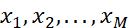 = the clues
 = how important each clue is
- b = a little adjustment (like adding or removing a point to make things fair)
Once the computer adds all this together, it gets a number called a.
Turning the Number Into a Decision
Now the computer must decide: Is this object in Group 1 or Group 2?
It uses a tiny but powerful rule called the Heaviside step function:
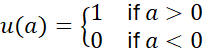
This means:
- If the number is positive, the computer says: “Group 1!”
- If the number is negative, it says: “Group 2!”
Just like flipping a switch ON or OFF.
Drawing a Line to Separate Two Groups
Imagine we draw all our objects as little dots on a piece of paper.
Each dot has two numbers (like a treasure map with an X and Y position).
Then, the computer finds a line that best separates the dots:
- Green dots on one side
- Red dots on the other side
This line is called a decision boundary.
In 2D (just a flat paper), the boundary is a line.
In more dimensions, it becomes a hyperplane, which is a fancy word for:
“A separator in any number of dimensions.”
So the idea is very simple:
Find a line (or hyperplane) that divides the two groups.
Why This Helps Computers
This method helps computers answer yes/no questions like:
- “Is this email spam?”
- “Is this picture showing a cat?”
- “Is this fruit ripe or not?”
All the computer does is:
look at clues → add them up → check if the result is above or below zero.
Easy!
Bibliography
Here are some friendly sources that talk about binary classification and hyperplanes:
- “Support Vector Machines for Binary Classification” – MATLAB & Simulink documentation
https://www.mathworks.com/help/stats/support-vector-machines-for-binary-classification.html [mathworks.com] - “Support Vector Machine (SVM) Algorithm – GeeksforGeeks”
https://www.geeksforgeeks.org/machine-learning/support-vector-machine-algorithm/ [geeksforgeeks.org] - “Understanding SVM for Binary Classification | Step-by-step Tutorial” – YouTube
https://www.youtube.com/watch?v=7VdX1uiUdME
[youtube.com]
The Support Vector Machine (SVM) is a supervised machine‑learning algorithm used for both classification and regression, but it is especially popular for binary classification tasks. Its main goal is to find the best boundary, called a hyperplane, that separates data into two classes. The “best” hyperplane is the one that creates the largest margin, meaning the greatest distance between the hyperplane and the nearest data points from each class. These closest points are known as support vectors.
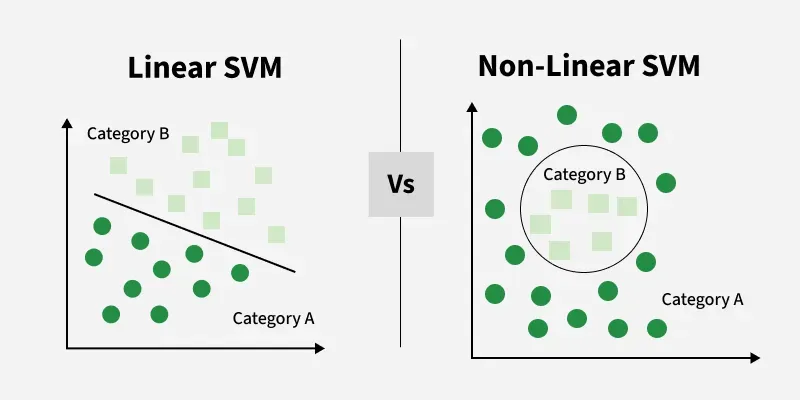
© Image. https://www.geeksforgeeks.org/
 @Yolanda Muriel

 yolandamuriel.com