In this new episode of AI Chinese Speech, I share a short video I recorded and its full Chinese transcription. This time, I want to show how you can go much faster if you use LingQ together with your own videos.
From video to text
After recording myself speaking Chinese, I transcribed the video using automatic speech recognition. Seeing my own words written in Chinese is a completely different experience — I’m not just studying someone else’s dialogues anymore, but my own ideas expressed in another language. That makes every sentence meaningful and easier to remember.
Importing into LingQ
Once I have the text, I import it into LingQ as a new lesson. I simply paste the transcription, attach the video link, and immediately LingQ turns it into an interactive study material: every word becomes clickable, with pinyin and translation available in one click.
In just a few minutes, my own video becomes a dynamic Chinese lesson.
The advantage of video + text
Watching the video while reading the transcription helps me connect sound, tone, and meaning more deeply. I can compare how I actually pronounced each word with how it should sound, notice tones I missed, and mark vocabulary that still feels new.
LingQ keeps track of all unknown words automatically, so I can review them later as flashcards or mini listening drills.
What is LingQ?
LingQ is an online language learning platform that allows you to learn languages through real-world content. You can import your own materials, such as videos, articles, and podcasts, and turn them into interactive lessons. With features like clickable words, pinyin, translations, and spaced repetition, LingQ helps you learn vocabulary in context and track your progress. It’s available on the web and as a mobile app, making it convenient to learn anytime, anywhere.
Using LingQ Free Version
With LingQ’s free version, you cannot upload your own videos as lessons. But you can copy the transcription of your video into LingQ as text. Once pasted, LingQ makes every word clickable, provides pinyin, and allows translations.
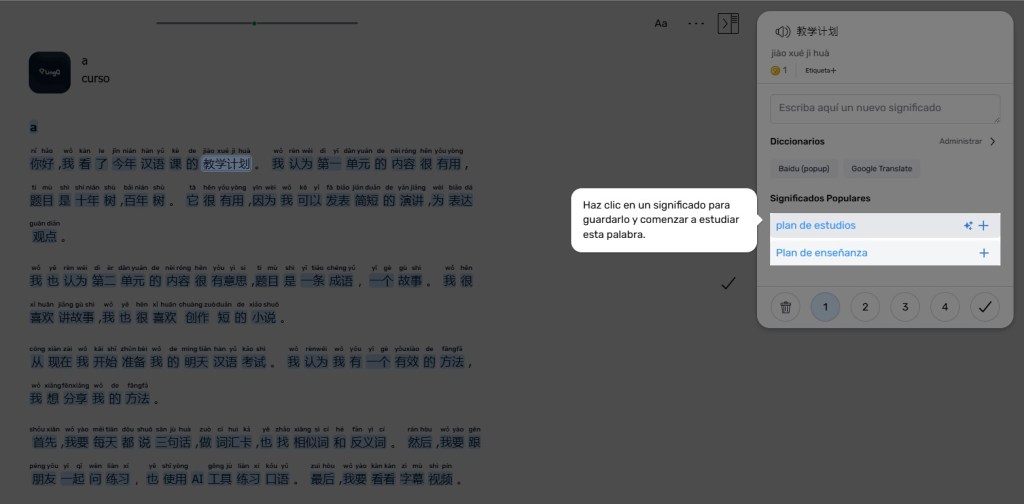


Even without embedding the video directly, you can:
- Watch your video separately.
- Read along with the transcription in LingQ.
- Click on unknown words for instant translation.
This way, you still connect your speaking, listening, and reading skills, and LingQ tracks the words you are learning.
The advantage of video + text
Watching your video while reading the transcription helps connect sound, tone, and meaning. You can compare your pronunciation with the correct pronunciation, notice tones you missed, and mark vocabulary you don’t know yet. Even without embedding the video, this combination accelerates learning.
Going faster
By combining your own transcription with LingQ:
- You save time looking up words manually.
- Every sentence becomes a personalized lesson.
- You strengthen your listening, reading, and speaking all at once.
Try it yourself
Try to record your own short Chinese video, transcribe it, and upload it to LingQ.
The moment you study your own voice in another language, the learning process changes completely.
你好,我看了今年汉语课的教学计划。 我认为第一单元的内容很有用, 题目是十年树,百年树。 它很有用,因为我可以发表简短的演讲, 为表达观点。
我也认为第二单元的内容很有意思, 题目是一条成语,一个故事。 我很喜欢讲故事, 我也很喜欢创作短的小说。
从现在我开始准备我的明天汉语考试。我认为我有一个有效的方法, 我想分享我的方法。
首先,我要每天都说三句话, 做词汇卡, 也找相似词和反义词。 然后,我要跟朋友一起问练习,也使用AI工具练习口语。 最后,我要看看字幕视频。


